To setup your Willow devices, Watch the short video and/or read of the following guides.
Pair Hub
- Navigate to hardware screen & Press + icon in top right corner
- Select 'Add New Hub'
- Unbox and plugin your Willow Hub with the provided USB-C cable. The Hub needs to be plugged in at all times and acts as the HQ for Willow, gathering the data from all of your Sensors
- Ensure Bluetooth is turned on your phone and press the search button
- Your device should now have been discovered. Select the Pair button
- Allow pairing on phone system popup
- Once paired, you can now connect your Hub to the Wi-Fi. A reminder, this needs to be a 2.4GHz band.
- Provide WiFi credentials
- Set location for Hub
Pair Sensors
With your Hub online, you can now pair your Sensors.
- Select your Sensor and separate the top half from the bottom probe.
- Using the provide pin, engage the button on the bottom of the device for two seconds. It will start to flash red.
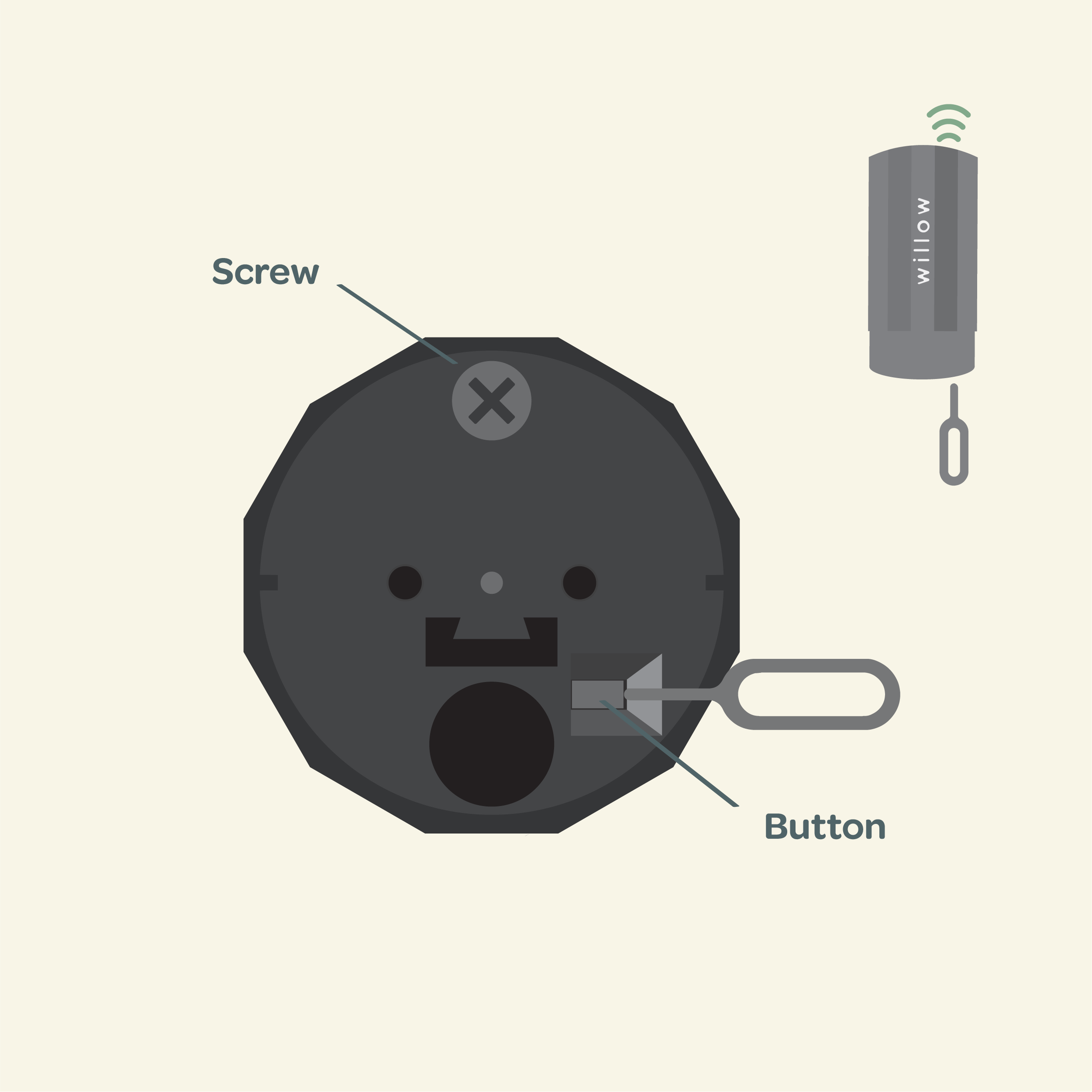
3. Within the app, select scan for sensors
4. Your device should now have been discovered. Select the Pair button
5. Once paired, select either a new or existing plant to pair the Sensor with.
If you are encountering any issues with your setup, check out our Support Page or reach out to us at support@plantwithwillow.com.au and we'll be happy to help get you up and running!


